WriterDeck_

Field Review · Distraction-Free Writing

Best Modern Day Typewriter

Lucas Schiavini
by Lucas Schiavini · originally posted on reddit · 1.2K upvotes
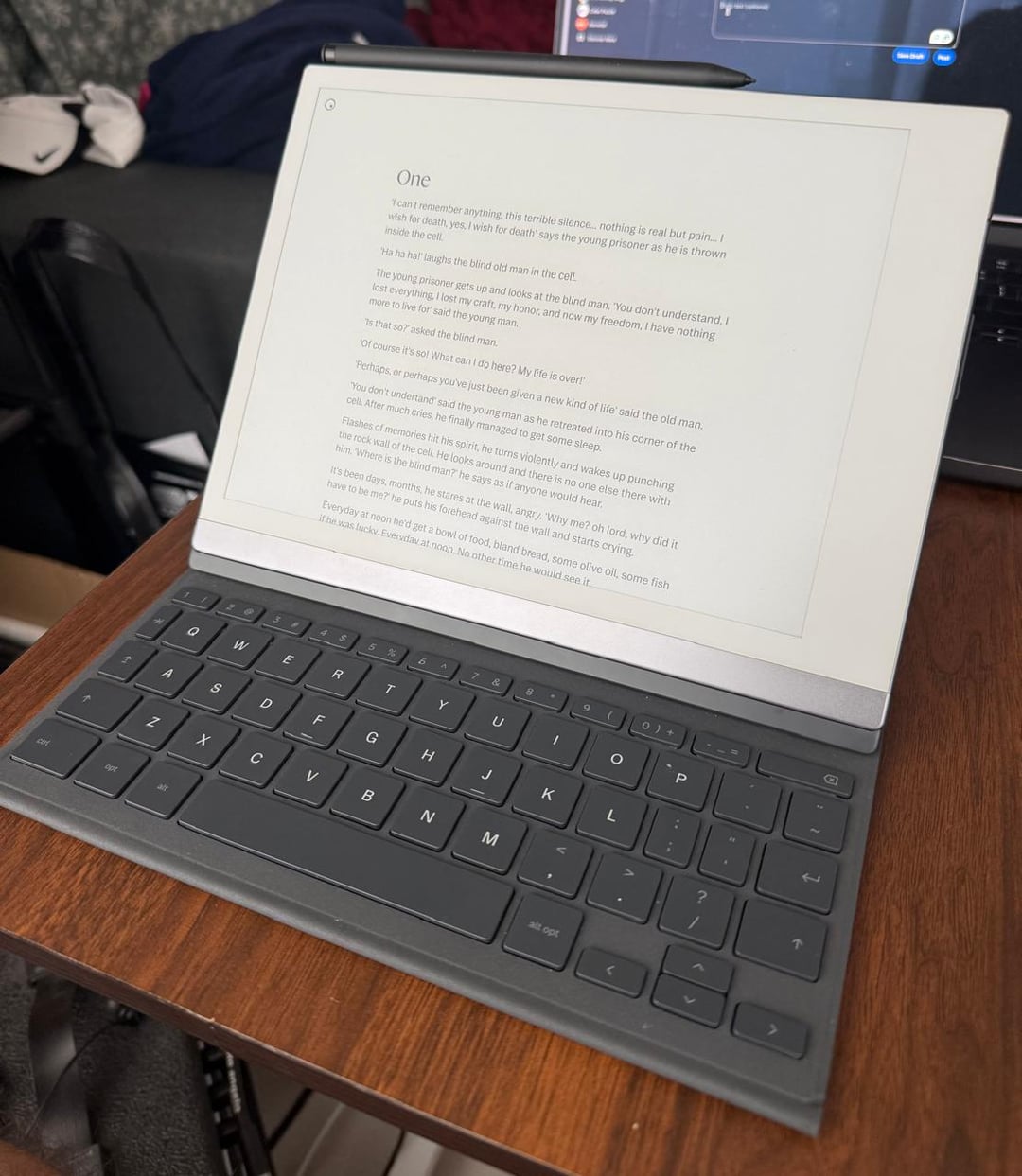
reMarkable 2 tablet with Type Folio keyboard cover, open on a table like a modern typewriter
reMarkable 2 + Type Folio — an e-ink typewriter that fits in a small bag.

Bit of a low effort post, but I just wanted to say that out of everything I've tried, a remarkable 2 + typefolio (keyboard cover) is the most delightful setup for writing on the go, at home, at a coffeeshop. It's very thin, and the cover opens up to a keyboard in a simple gesture, meaning it fits very easily in a small bag while keeping the screen size very big.

· · ·

From the comments

// what other writers said

The case is light and thin but sturdy, the keys are low with short travel, but are quiet and feel great. I can think of no more convenient tool for a writer on the go. — Careful_Macaron_2435
I use it in trial. I type out my outline the day before, edit on the fly as I hear the opposing lawyer, then remove the keyboard and take the final product to the podium for closing remarks. Easy, clean, thin and portable. — Electrical-Bowl-2993
The lag is a nothing burger. You shouldn't be looking at the screen if you are in flow. — docpark

Frequently Asked Questions

// answered by the author in the original thread

What exactly is this device?

A reMarkable 2 e-ink tablet paired with the Type Folio — a keyboard cover that attaches magnetically and slides open in one gesture. Together they act like a typewriter, not a laptop or a regular tablet.

Is it worth it over an iPad?

If you think an iPad is enough, go with the iPad. This is not a tablet replacement — it's a replacement for stacks of physical notebooks and a portable typewriter. It replicates the paper feeling well, with no notifications and no apps: just you and the writing.

It's only worth it if you find the lack of functionality a good thing — if you care a lot about not being distracted while working. If not, get a normal tablet.

Do you need a subscription?

No. You can sync notes via Google Drive or email them to yourself for free. The optional Connect subscription (~$3/month) makes copying notes between the tablet and a computer much smoother — handy if you move chapters between the reMarkable, Google Docs, and Obsidian.

How comfortable is the Type Folio keyboard?

Coming from a keyboard snob who owns a Keychron K3 v2, a Logitech mechanical mini, and a ZSA Voyager: it feels just like a MacBook keyboard. Four-hour writing sessions with no hand pain. Not as good as a full mechanical, but the fact that it's always attached to the cover — thin, no bulk, no separate keyboard to carry — is a game changer.

Is there typing delay on the e-ink screen?

There's a small, noticeable delay, but for most people it's a non-issue once you're in flow. If you've used newer e-ink devices (like an Onyx Boox, which is much faster), you'll notice it more. Some heavy typists in the thread found it bothersome — worth trying before buying if you type very fast.

Can you use an external or Bluetooth keyboard?

Not with the reMarkable 2 — Bluetooth isn't enabled (the chip may exist, but drivers are off by default). If you want a mechanical or custom keyboard, look at alternatives like Supernote or Onyx Boox, which support Bluetooth keyboards and have no subscription.

Wasn't the reMarkable 2 discontinued?

Yes — it was recently discontinued, but you can still find plenty for sale at Best Buy-type shops and secondhand (eBay, Mercari). The current lineup: the Paper Pro (13", color e-ink, has a Type Folio, but bigger, darker screen with backlight) and the Pure (same form factor as the RM2 but no pogo pins, so no keyboard folio). For a portable black-and-white typewriter setup, the RM2 + Type Folio remains the sweet spot.

How distracting is it? Any notifications or apps?

None. You can either read ebooks or write — that's it. No notifications, no apps beyond note-taking and reading PDFs. The replacement isn't an iPad; it's physical notebooks + a typewriter + physical books.

Does it have dark mode or a backlight?

No dark mode and no backlight — it works with ambient light, like paper (you can't read it in the dark). The upside: it's easy on the eyes. Writers prone to migraines and screen-induced eye strain report it doesn't trigger them the way LCD screens do.

What formats do files export as?

Typed notes export as PDF, PNG, SVG, or plain text via email. Copying chapters to a computer pastes as Markdown (works great with Obsidian). Handwritten notes export as PDF, PNG, or SVG.

Can you handwrite and doodle on it too?

Yes — the pen + screen was the original product for years; the Type Folio came later. It has replaced 15+ physical journals: handwritten notes, journal entries, even hand-drawn maps for a fantasy novel.

What text formatting is available?

Headers, subheaders, lists, bold, and italics — that's about it. You can choose where text begins on the page. Character size is tied to whether text is a header or body. Notably missing: tab indentation (yes, really). But deep down it's just Linux, and community hacks exist.

How portable is it really?

Lighter than a MacBook Air, far lighter than a Pro. The 10" screen is the right size for a small bag — the 13" Paper Pro is noticeably harder to carry to a coffeeshop. It's also small and comfortable enough to sit on your lap for writing chapters in bed.

Talk to me
[ close ]

Say hello